Page 1 of 1
Application controls layout bug
Posted: Tue Sep 17, 2013 8:24 pm
by makanmel
Several days ago I started to observe the bug with application controls layout.
All of the controls are at the top left position.
And I see several error messages at application launch.
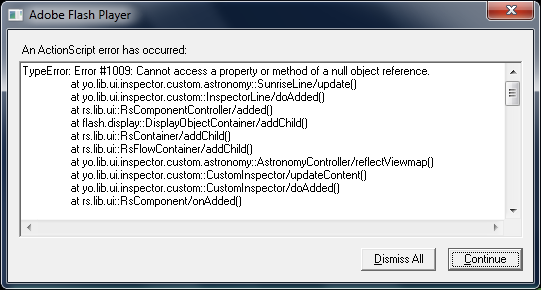
- 20130917_220756.png (25.8 KiB) Viewed 8002 times
Windos 7 x64 Pro
FlashPlayer 11.8.800.174 (debug version)
Re: Application controls layout bug
Posted: Wed Sep 18, 2013 12:35 pm
by par
Thanks for reporting!
Which build number of YoWindow are you running?
Can you see this error all the time or only under certain conditions?
Re: Application controls layout bug
Posted: Wed Sep 18, 2013 2:25 pm
by makanmel
par wrote:Thanks for reporting!
Which build number of YoWindow are you running?
Can you see this error all the time or only under certain conditions?
Yes, all the time. On start and on restore from system tray.
Now I use YoWindow 3S Build 150, but earlier I have been using one of the previous versions and the bug was present too.
Re: Application controls layout bug
Posted: Wed Sep 18, 2013 2:55 pm
by makanmel
BTW, no bug on my work PC.
Windows 7 x64 Pro
FlashPlayer: 11,7,700,202 (debugger)
YoWindow 3S Build 145
Re: Application controls layout bug
Posted: Fri Sep 20, 2013 7:51 am
by par
Thank you!
Can you send me options.xml file?
To
support@repkasoft.com
C:\Users\[your user name]\AppData\Roaming\YoWindow
Replace [your user name] with your Windows login (user) name
Re: Application controls layout bug
Posted: Fri Sep 20, 2013 7:22 pm
by makanmel
Sent.
Re: Application controls layout bug
Posted: Mon Sep 23, 2013 10:03 pm
by makanmel
Today everything became OK with the layout on my home PC.
Don't know what happened, but today I have upgraded RAM from 4G to 8G.
Re: Application controls layout bug
Posted: Wed Sep 25, 2013 2:47 pm
by par
Thanks, I hope to find time this or next week to investigate the source of the problem with the options.xml file you've sent me.